
InfographicGPT Image
Vintage Steam Locomotive Engineering Poster
A free infographic prompt for GPT Image. Copy it as-is, or change the subject and details to fit your idea.
Full prompt
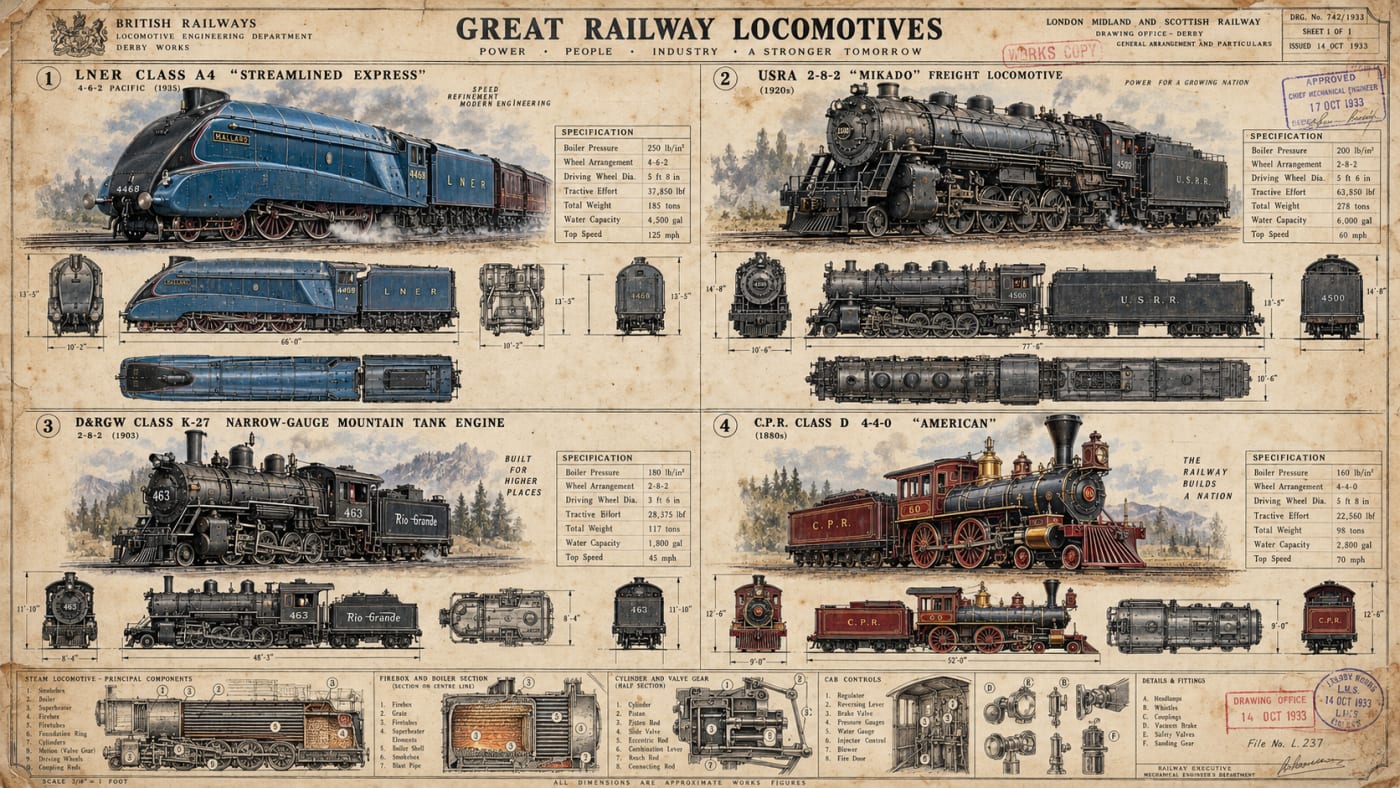
Create a collectible vintage engineering poster, 16:9 landscape, featuring four classic steam locomotives: a streamlined 1930s express engine, a heavy freight 2-8-2 "Mikado", a narrow-gauge mountain tank engine and a 4-4-0 American passenger locomotive.

Base: aged cream drafting paper with fibres, foxing and faded ink — the look of a 1930s railway works drawing office.

For each locomotive: one prominent realistic 3/4 hero rendering, ringed by front, side, rear and top orthographic drawings with dimension lines.

Add compact spec panels for boiler pressure, wheel arrangement, driving-wheel diameter, tractive effort, weight, water capacity and top speed. Include cut-away studies of the firebox, boiler tubes, cylinders and valve gear, plus small detail sketches of headlamps, whistles, couplings and cab controls.

Use numbered callouts, arrows, measurement lines, period stencil and serif lettering, rubber-stamp marks and pencil annotations so it reads as an authentic works document rather than a modern infographic.

Highly detailed, realistic metal rendering blended with hand-inked technical linework, archival print texture, ultra-high resolution.
How to use this prompt
- 1Copy the full prompt with the Copy prompt button.
- 2Open GPT Image or an image node in TrendyFlow and paste the prompt.
- 3Swap the subject, style, colours or on-image text to fit your idea, then generate and iterate.
This is a free prompt from TrendyFlow's library. Explore more infographic prompts, all free to copy and adapt.
More infographic promptsRelated prompts
Questions about this prompt
Can I change this infographic prompt for my own subject?
Yes. Keep the structure (format, layout, style and constraints) and replace only the subject, names, colours or text. Changing one section at a time makes it easier to see what each edit does.
Do I need a reference image for this prompt?
No. This prompt works from text alone, though you can add a reference image if you want to match a specific person, product or style.
What aspect ratio should I use?
Use the aspect ratio written in the prompt when there is one, since the layout depends on it. Otherwise pick 4:5 or 9:16 for social posts and 16:9 for presentations and video thumbnails.