
InfographicGPT Image
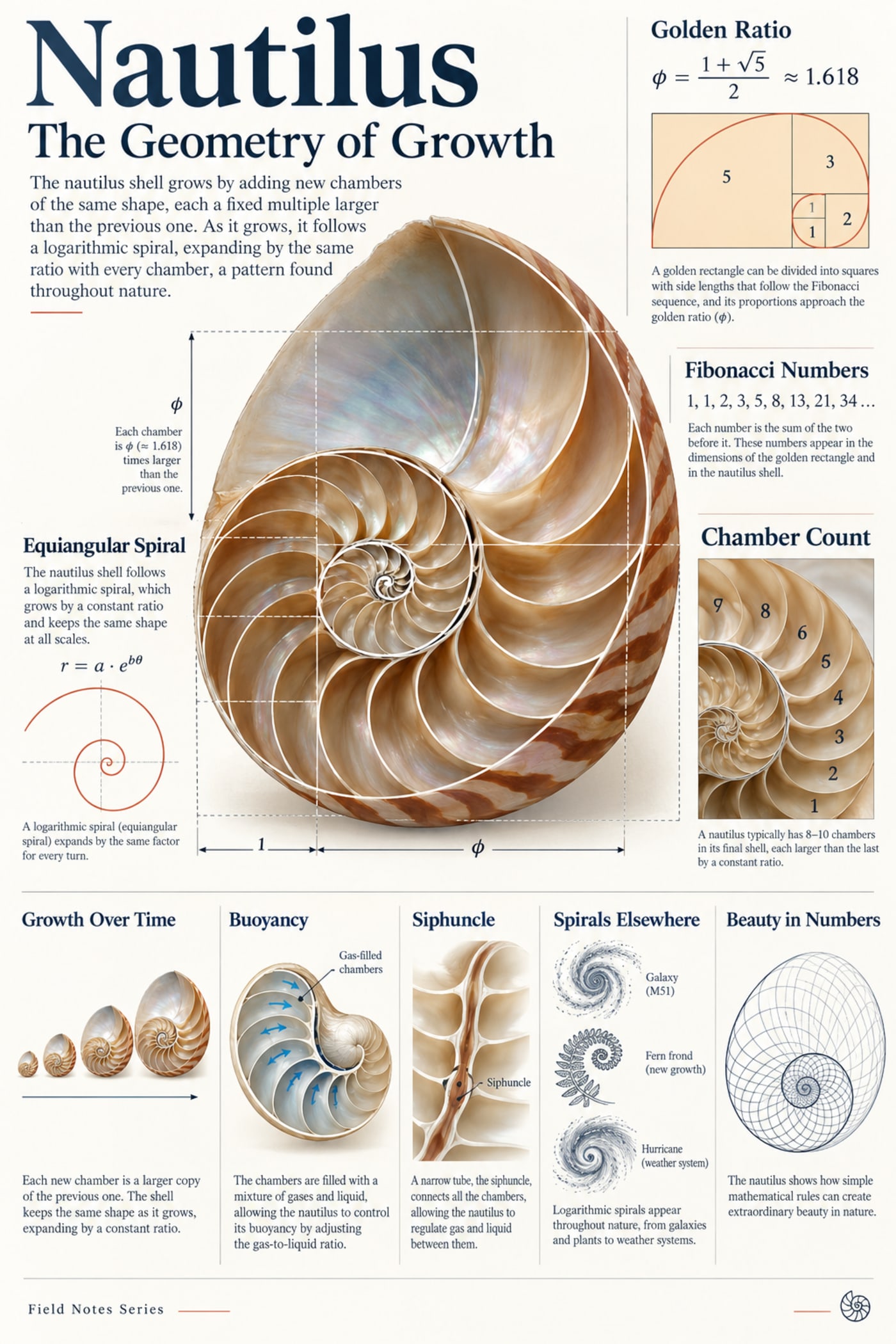
Nautilus Shell Geometry of Growth Infographic
A free infographic prompt for GPT Image. Copy it as-is, or change the subject and details to fit your idea.
Full prompt
Create a vertical scientific infographic poster titled "Nautilus — The Geometry of Growth", minimalist and elegant: soft sea-salt white background, deep navy text, coral accents.

LAYOUT:
1. Top left — big serif title "Nautilus", subtitle "The Geometry of Growth", and a short paragraph on how the shell grows by the same ratio with every chamber.
2. Centre — a large realistic cut-away illustration of a nautilus shell showing its pearly chambers, overlaid with a fine white logarithmic spiral and a golden-rectangle grid.
3. Right column:
   • "Golden Ratio" — φ = (1+√5)/2 ≈ 1.618 with a golden rectangle split into squares labelled 1, 1, 2, 3, 5, 8.
   • "Fibonacci Numbers" — 1, 1, 2, 3, 5, 8, 13, 21, 34… with one line of explanation.
   • "Chamber Count" — a close-up of the chambers with each one numbered.
4. Middle left — "Equiangular Spiral": the formula r = a·e^(bθ) with a simple line spiral.
5. Bottom row, five small panels: "Growth Over Time" (four shells from small to large), "Buoyancy" (gas-filled chambers diagram), "Siphuncle" (the connecting tube), "Spirals Elsewhere" (a galaxy, a fern frond and a hurricane as tiny line icons), "Beauty in Numbers" (a wireframe nautilus).
6. Footer — small text "Field Notes Series" bottom left.

STYLE: crisp vector diagrams combined with realistic natural-history illustration, clean sans-serif labels, generous spacing, educational and calm.
How to use this prompt
- 1Copy the full prompt with the Copy prompt button.
- 2Open GPT Image or an image node in TrendyFlow and paste the prompt.
- 3Swap the subject, style, colours or on-image text to fit your idea, then generate and iterate.
This is a free prompt from TrendyFlow's library. Explore more infographic prompts, all free to copy and adapt.
More infographic promptsRelated prompts
Questions about this prompt
Can I change this infographic prompt for my own subject?
Yes. Keep the structure (format, layout, style and constraints) and replace only the subject, names, colours or text. Changing one section at a time makes it easier to see what each edit does.
Do I need a reference image for this prompt?
No. This prompt works from text alone, though you can add a reference image if you want to match a specific person, product or style.
What aspect ratio should I use?
Use the aspect ratio written in the prompt when there is one, since the layout depends on it. Otherwise pick 4:5 or 9:16 for social posts and 16:9 for presentations and video thumbnails.