
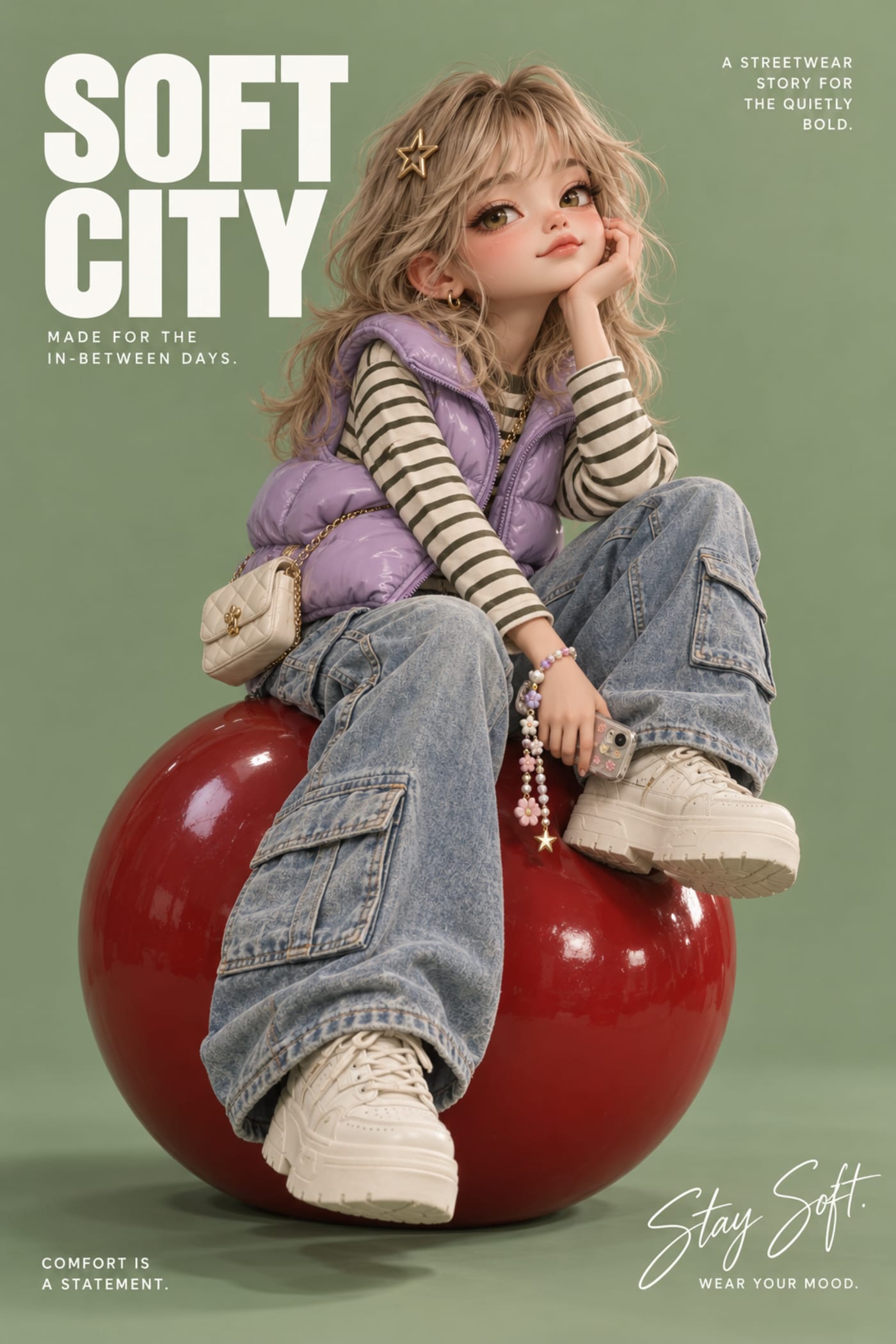
3D Chibi Girl Streetwear Fashion Poster
A free 3d render prompt for GPT Image. Copy it as-is, or change the subject and details to fit your idea.
Full prompt
Create a vertical fashion poster featuring a 3D-rendered chibi girl sitting on a glossy cherry-red sphere against a solid sage-green background. She has a fluffy honey-blonde wolf cut with bangs, large sparkling hazel eyes and a calm, slightly smug expression. She wears an oversized lilac puffer vest over a striped long-sleeve tee, wide-leg cargo jeans and chunky white platform sneakers. Accessories: a gold star-shaped hair clip, a beaded phone charm on her wrist and a tiny quilted crossbody bag.

TYPOGRAPHY:
• Top left: large bold white sans-serif text "SOFT CITY" stacked in two lines, with smaller text below: "MADE FOR THE IN-BETWEEN DAYS."
• Top right: a small right-aligned block: "A STREETWEAR STORY FOR THE QUIETLY BOLD."
• Bottom left: small left-aligned text "COMFORT IS A STATEMENT."
• Bottom right: handwritten script "Stay Soft." followed by small sans-serif text "WEAR YOUR MOOD."

STYLE: high-end 3D character render with soft subsurface skin, realistic fabric textures (puffer sheen, denim weave, cotton stripes), soft studio lighting with a gentle shadow under the sphere, clean editorial layout with plenty of negative space.
How to use this prompt
- 1Copy the full prompt with the Copy prompt button.
- 2Open GPT Image or an image node in TrendyFlow and paste the prompt.
- 3Swap the subject, style, colours or on-image text to fit your idea, then generate and iterate.
This is a free prompt from TrendyFlow's library. Explore more 3d render prompts, all free to copy and adapt.
More 3d render promptsRelated prompts
Questions about this prompt
Can I change this 3d render prompt for my own subject?
Yes. Keep the structure (format, layout, style and constraints) and replace only the subject, names, colours or text. Changing one section at a time makes it easier to see what each edit does.
Do I need a reference image for this prompt?
No. This prompt works from text alone, though you can add a reference image if you want to match a specific person, product or style.
What aspect ratio should I use?
Use the aspect ratio written in the prompt when there is one, since the layout depends on it. Otherwise pick 4:5 or 9:16 for social posts and 16:9 for presentations and video thumbnails.