
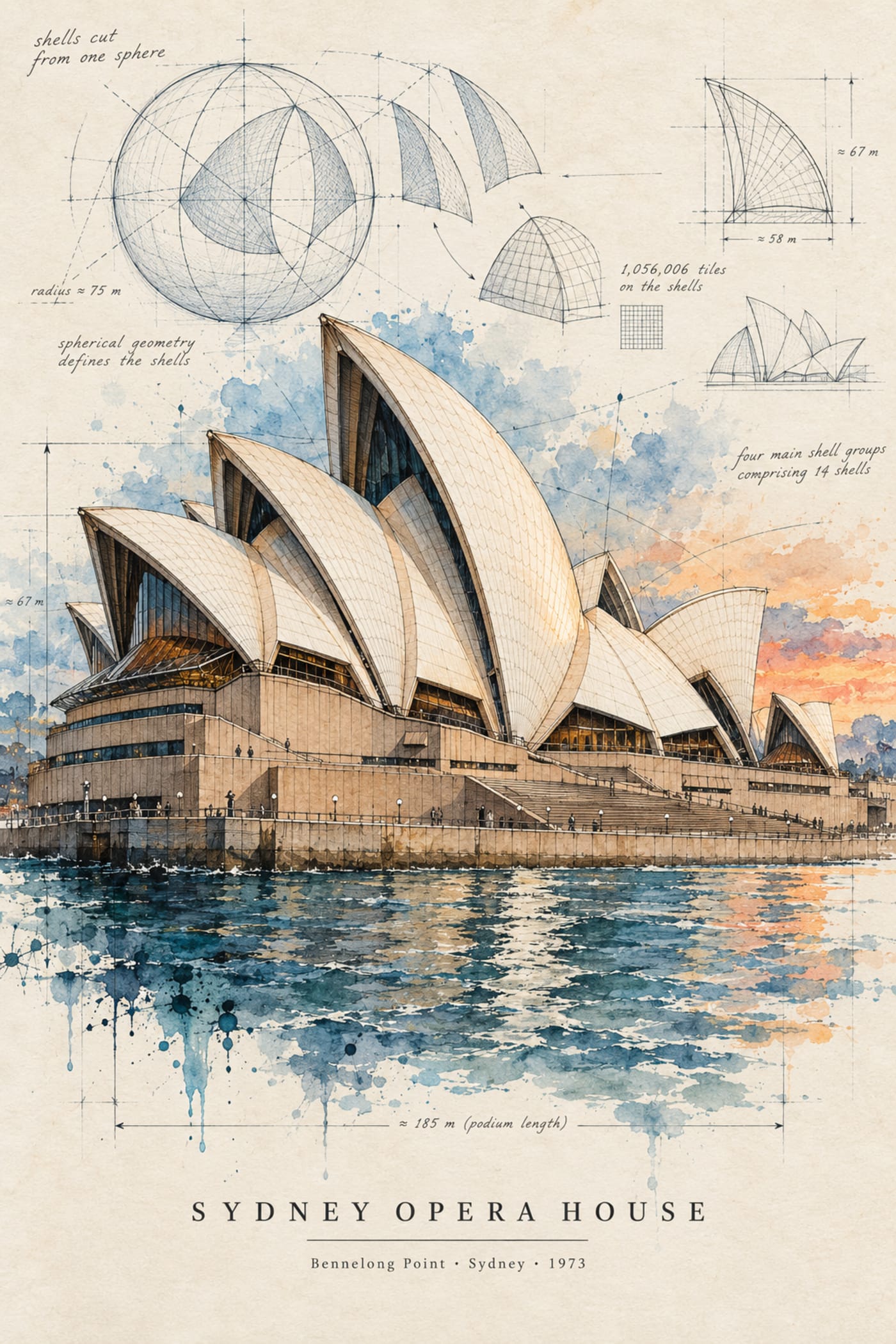
Sydney Opera House Ink & Watercolor Architectural Poster
A free poster prompt for GPT Image. Copy it as-is, or change the subject and details to fit your idea.
Full prompt
Create a premium 2:3 vertical architectural art poster of the Sydney Opera House, combining precise architectural sketching with expressive ink and watercolour.

COMPOSITION: one architecturally accurate view of the building in a dynamic three-quarter perspective from the harbour side, filling 60–70% of the frame. Preserve the recognisable sail-shaped shell vaults, their ribbed tile pattern, the broad granite podium and the monumental steps.

ART STYLE: intricate hand-drawn ink lines, graphite sketching, delicate cross-hatching, translucent watercolour washes, organic imperfections, and expressive ink splashes and harbour-water drips gathered around the podium.

TECHNICAL LAYER: fine cyan and muted-teal construction lines, the spherical geometry diagram that defines the shells (a sphere with segments cut from it), perspective guides, measurement arrows and a few subtle handwritten notes tied to the real structure, e.g. "shells cut from one sphere", "1,056,006 tiles".

COLOUR & BACKGROUND: warm off-white textured paper; mostly monochrome ink with soft washes of cream, sand, harbour blue and a hint of sunset coral on the shells.

TEXT: small and secondary — "SYDNEY OPERA HOUSE" in spaced capitals near the bottom, with "Bennelong Point · Sydney · 1973" in a light serif.

FINISH: gallery-quality art print, visible paper grain, generous margins, balanced negative space. No photorealism, no extra buildings in front, no watermark.
How to use this prompt
- 1Copy the full prompt with the Copy prompt button.
- 2Open GPT Image or an image node in TrendyFlow and paste the prompt.
- 3Swap the subject, style, colours or on-image text to fit your idea, then generate and iterate.
This is a free prompt from TrendyFlow's library. Explore more poster prompts, all free to copy and adapt.
More poster promptsRelated prompts

Questions about this prompt
Can I change this poster prompt for my own subject?
Yes. Keep the structure (format, layout, style and constraints) and replace only the subject, names, colours or text. Changing one section at a time makes it easier to see what each edit does.
Do I need a reference image for this prompt?
No. This prompt works from text alone, though you can add a reference image if you want to match a specific person, product or style.
What aspect ratio should I use?
Use the aspect ratio written in the prompt when there is one, since the layout depends on it. Otherwise pick 4:5 or 9:16 for social posts and 16:9 for presentations and video thumbnails.