
Hyper-realisticGPT Image
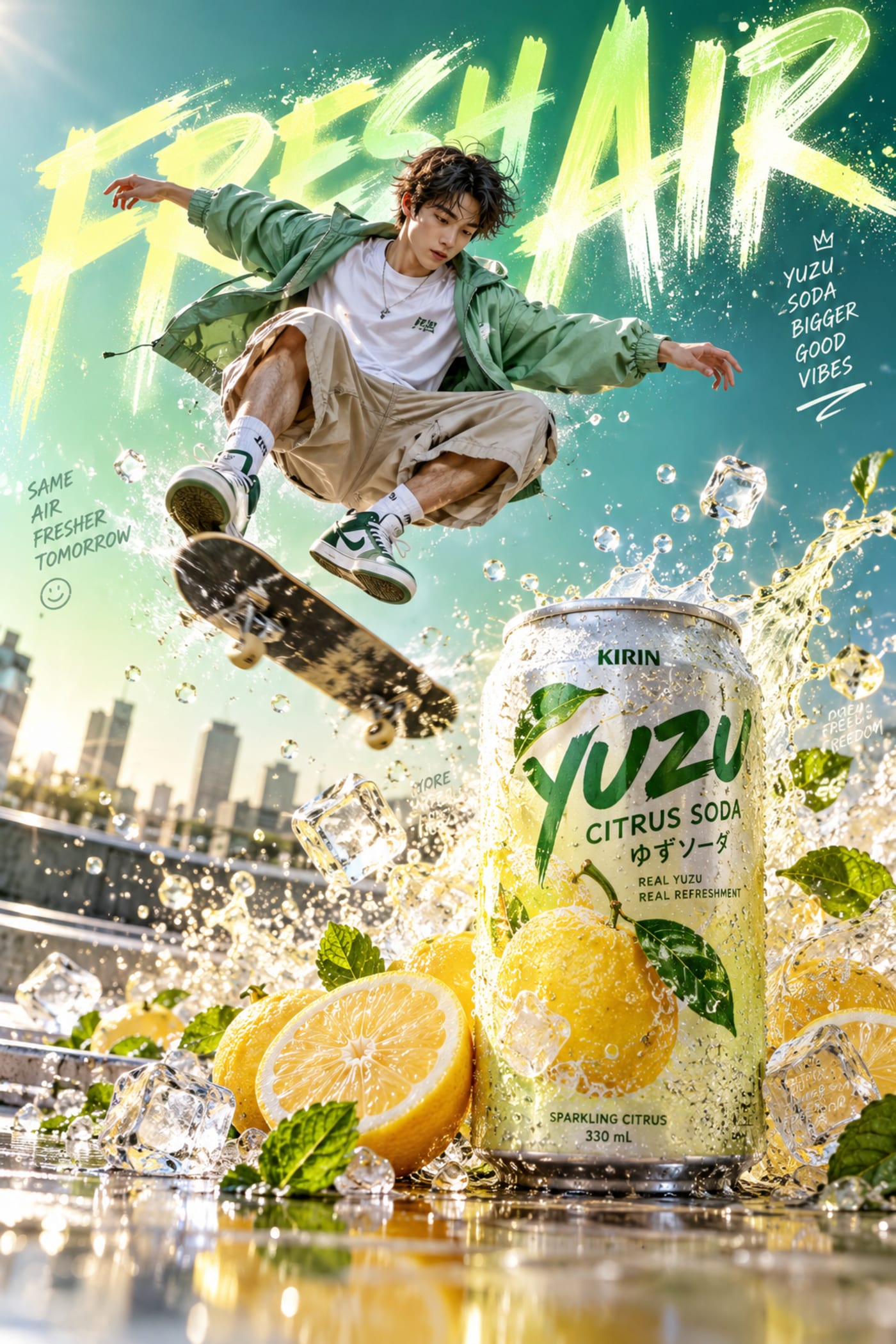
Yuzu Citrus Soda Hyper-Real Skate Advertisement
A free hyper-realistic prompt for GPT Image. Copy it as-is, or change the subject and details to fit your idea.
Full prompt
A hyper-realistic commercial advertisement blending a sparkling yuzu-citrus soda with skateboarding. A young male skateboarder is caught mid-air in a kickflip, wearing a loose white tee, mint-green track jacket, wide beige cargo shorts and high-top sneakers, surrounded by explosive splashes of pale-yellow citrus soda, flying ice cubes and fizzing bubbles. A cold aluminium can of yuzu soda bursting with droplets sits sharp in the foreground, heavy with condensation, with fresh halved yuzu and mint leaves scattered on a glossy reflective surface.

Bright cinematic lighting with crisp highlights and motion blur on the board. A vivid lime-to-teal gradient background with bold glowing typography behind the skater reading "FRESH AIR". Ultra-detailed, high contrast, razor-sharp product focus, commercial product photography, advertising-poster aesthetic, energetic, playful and refreshing.
How to use this prompt
- 1Copy the full prompt with the Copy prompt button.
- 2Open GPT Image or an image node in TrendyFlow and paste the prompt.
- 3Swap the subject, style, colours or on-image text to fit your idea, then generate and iterate.
This is a free prompt from TrendyFlow's library. Explore more hyper-realistic prompts, all free to copy and adapt.
More hyper-realistic promptsRelated prompts

Questions about this prompt
Can I change this hyper-realistic prompt for my own subject?
Yes. Keep the structure (format, layout, style and constraints) and replace only the subject, names, colours or text. Changing one section at a time makes it easier to see what each edit does.
Do I need a reference image for this prompt?
No. This prompt works from text alone, though you can add a reference image if you want to match a specific person, product or style.
What aspect ratio should I use?
Use the aspect ratio written in the prompt when there is one, since the layout depends on it. Otherwise pick 4:5 or 9:16 for social posts and 16:9 for presentations and video thumbnails.