
Clay styleGPT Image
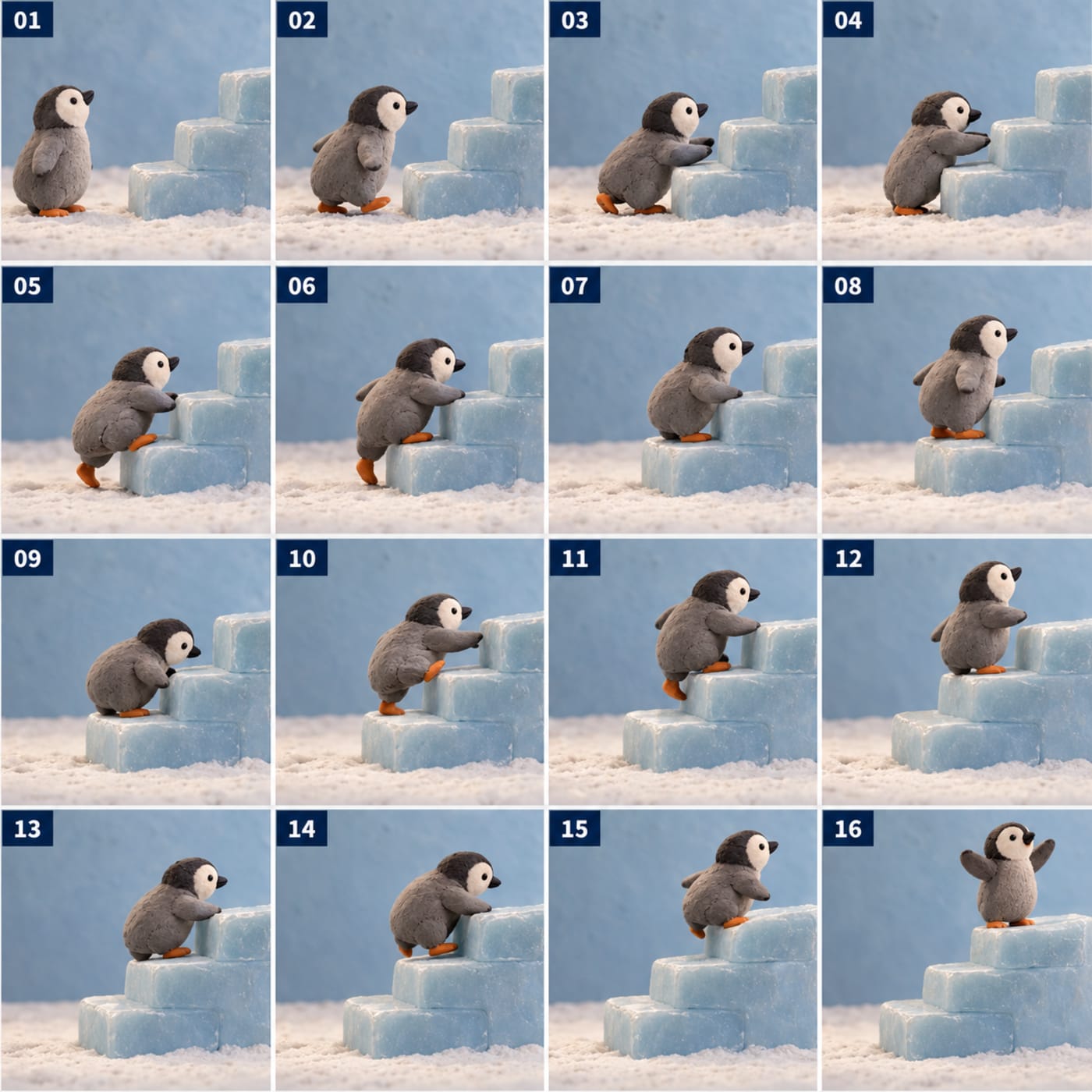
Claymation Penguin Ice-Step Climb 16-Frame Contact Sheet
A free clay style prompt for GPT Image. Copy it as-is, or change the subject and details to fit your idea.
Full prompt
GOAL: a claymation stop-motion contact sheet of a cute penguin chick climbing a short flight of ice steps, like frames from an animation test.

CANVAS: square, 4×4 grid of exactly 16 equal panels separated by thin pale grid lines. Every panel is a still from the same side-view set. Soft studio lighting, gentle shadows, tactile handmade clay texture, a pale icy-blue backdrop and a snowy white clay floor.

CHARACTER: a small handmade clay penguin chick, fluffy grey body, white face mask, tiny black beak, round dot eyes, stubby flippers and orange feet, facing right in profile. Cheerful and determined, slightly imperfect sculpting with subtle fingerprints.

SET: a simple staircase of three chunky translucent pale-blue clay "ice" blocks on the right side, rounded edges and a slightly matte surface. Background identical in all frames.

FRAME LABELS: a small navy rectangle in each panel's top-left corner with white text 01 to 16 in reading order.

ACTION: frame 1 the chick stands looking up at the steps; 2–4 it waddles closer and stretches its flippers toward the first block; 5–8 it hops and scrambles onto the first step; 9–12 it wobbles, steadies itself and hops to the second step; 13–15 it climbs to the top step; 16 it stands proudly on top, flippers raised.

STYLE: photorealistic clay stop-motion miniature, like a behind-the-scenes frame sheet; cool muted colours with a warm key light; tiny camera inconsistencies and handcrafted imperfections; no glossy plastic, no realistic feathers.

RULES: exactly 16 panels, exactly one penguin and one staircase per panel, no extra characters, captions, watermark or borders beyond the thin grid and frame labels.
How to use this prompt
- 1Copy the full prompt with the Copy prompt button.
- 2Open GPT Image or an image node in TrendyFlow and paste the prompt.
- 3Swap the subject, style, colours or on-image text to fit your idea, then generate and iterate.
This is a free prompt from TrendyFlow's library. Explore more clay style prompts, all free to copy and adapt.
More clay style promptsRelated prompts

Questions about this prompt
Can I change this clay style prompt for my own subject?
Yes. Keep the structure (format, layout, style and constraints) and replace only the subject, names, colours or text. Changing one section at a time makes it easier to see what each edit does.
Do I need a reference image for this prompt?
No. This prompt works from text alone, though you can add a reference image if you want to match a specific person, product or style.
What aspect ratio should I use?
Use the aspect ratio written in the prompt when there is one, since the layout depends on it. Otherwise pick 4:5 or 9:16 for social posts and 16:9 for presentations and video thumbnails.