
IsometricGPT Image
Classic Fairy Tale Isometric Diorama: Jack and the Beanstalk
A free isometric prompt for GPT Image. Copy it as-is, or change the subject and details to fit your idea.
Full prompt
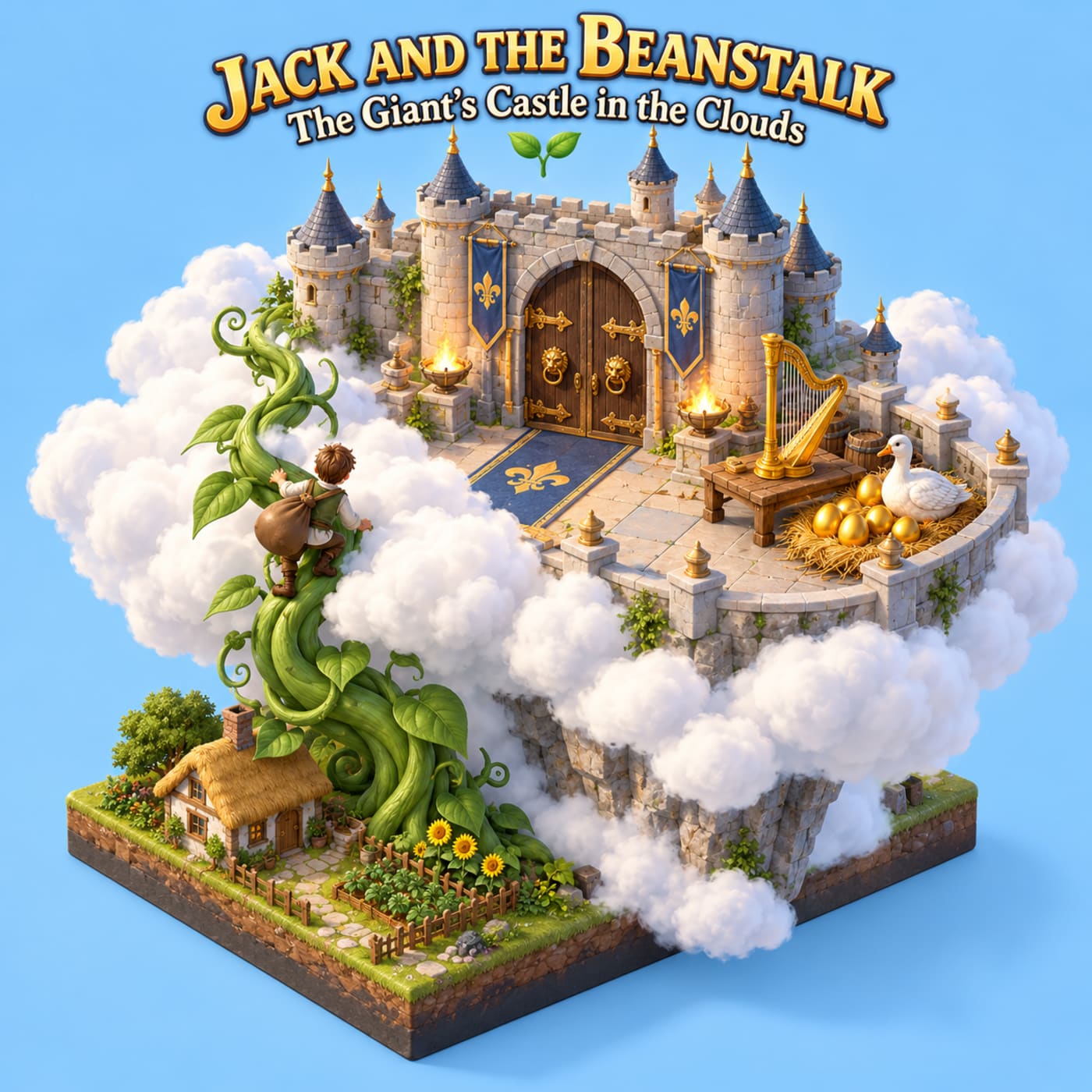
Present a clear 45° top-down isometric miniature 3D cartoon scene of "The Giant's Castle in the Clouds" from the classic fairy tale "Jack and the Beanstalk", with soft refined textures, realistic PBR materials and gentle lifelike lighting.

Build a small raised diorama base holding the scene's most recognisable elements: a giant twisting green beanstalk rising from a tiny cottage garden at one corner, puffy white clouds, a towering stone castle gate at the top, a golden harp on a table, a goose sitting beside a small pile of golden eggs, and a tiny Jack figure (no facial details) climbing over the cloud edge with a sack.

Clean solid pale sky-blue background.

At the top centre, show "JACK AND THE BEANSTALK" in large bold text, with "The Giant's Castle in the Clouds" in medium text beneath it, and a small simple bean-sprout emblem below. All text automatically contrasts with the background.

Composition: perfectly centred, square 1080×1080, ultra-clean, high-clarity diorama aesthetic.
How to use this prompt
- 1Copy the full prompt with the Copy prompt button.
- 2Open GPT Image or an image node in TrendyFlow and paste the prompt.
- 3Swap the subject, style, colours or on-image text to fit your idea, then generate and iterate.
This is a free prompt from TrendyFlow's library. Explore more isometric prompts, all free to copy and adapt.
More isometric promptsRelated prompts
Questions about this prompt
Can I change this isometric prompt for my own subject?
Yes. Keep the structure (format, layout, style and constraints) and replace only the subject, names, colours or text. Changing one section at a time makes it easier to see what each edit does.
Do I need a reference image for this prompt?
No. This prompt works from text alone, though you can add a reference image if you want to match a specific person, product or style.
What aspect ratio should I use?
Use the aspect ratio written in the prompt when there is one, since the layout depends on it. Otherwise pick 4:5 or 9:16 for social posts and 16:9 for presentations and video thumbnails.