
StoryboardGPT Image
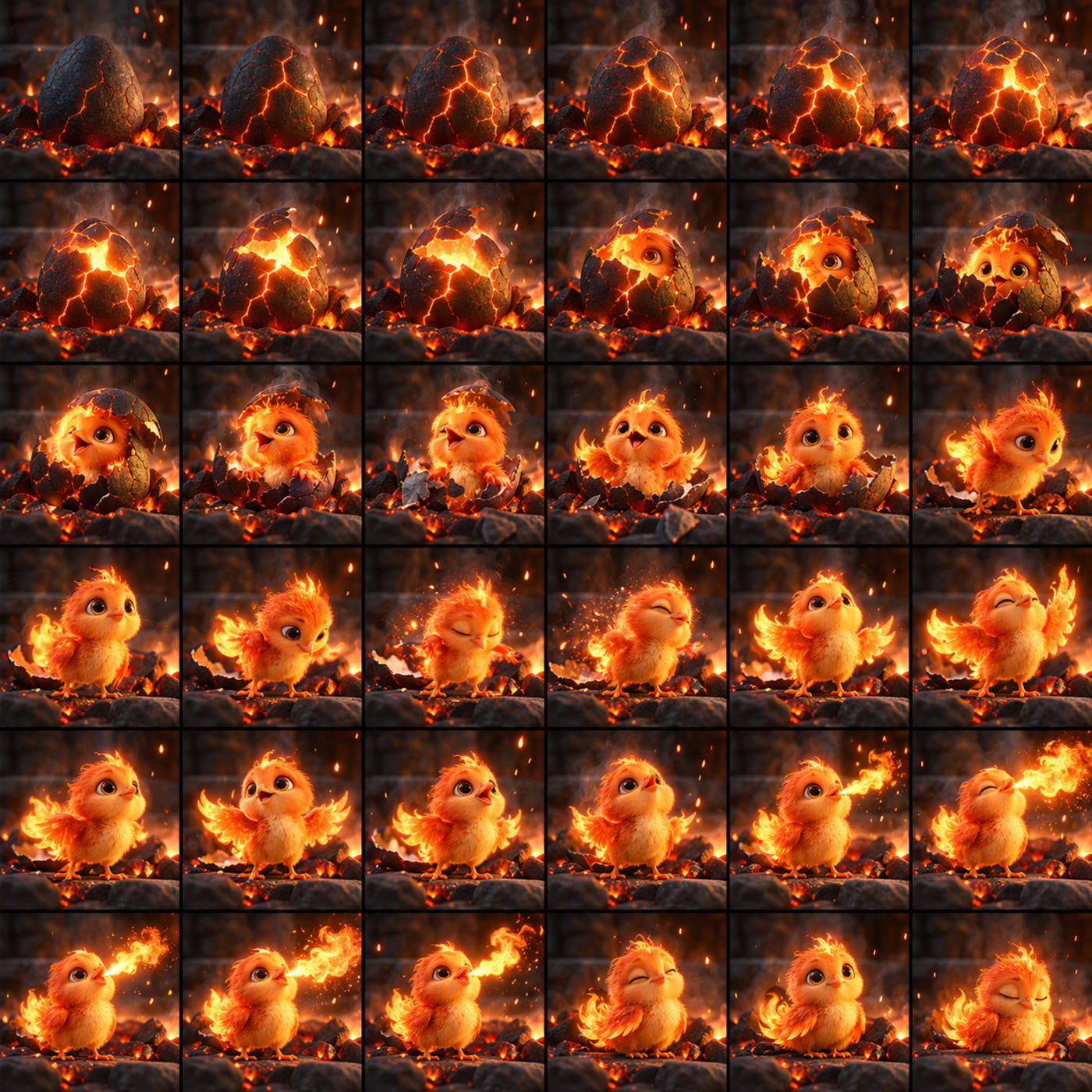
36 Panel Storyboard: Phoenix Chick Rising from the Embers
A free storyboard prompt for GPT Image. Copy it as-is, or change the subject and details to fit your idea.
Full prompt
Create a cinematic 6 × 6 storyboard contact sheet of exactly 36 square frames showing a baby phoenix hatching from a glowing ember egg, read left to right, top to bottom like a time-lapse animation.

CANVAS: square, 36 equal square panels with thin seamless dark gutters, no text. Every panel uses the same set-up: a dark charcoal stone hearth, warm light from the lower right, drifting sparks, soft smoke, shallow depth of field, high-end 3D animated fantasy look.

SUBJECTS: the egg is matte black volcanic stone with thin glowing orange cracks like cooling lava. The chick is round and fluffy with flame-orange and gold down, big shiny amber eyes, a tiny curved beak, stubby wings tipped with little flickering flames and a short fiery tail plume — adorable and family-friendly.

PROGRESSION:
Frames 1–6: the egg rests in glowing coals; its cracks pulse brighter.
Frames 7–12: cracks spread across the top; light leaks out; a glowing eye peers through.
Frames 13–18: a beak breaks through, the top shell lifts, fragments tumble into the coals.
Frames 19–24: the chick wobbles out and sits in the broken shell, then hops onto the hearth stone.
Frames 25–30: it shakes off ash, stretches its little flaming wings and tries a proud pose.
Frames 31–36: it puffs out a tiny burst of golden flame several times, then settles down content and glowing in the last frame.

STYLE: ultra-detailed 3D render, feature-animation character appeal, volumetric warm light, realistic stone and ember shards, smooth continuity, consistent proportions, same low camera angle and centred framing in every panel.

RULES: exactly 36 panels in a 6 × 6 grid; no text, labels, watermark, humans or extra creatures; background and lighting identical across frames.
How to use this prompt
- 1Copy the full prompt with the Copy prompt button.
- 2Open GPT Image or an image node in TrendyFlow and paste the prompt.
- 3Swap the subject, style, colours or on-image text to fit your idea, then generate and iterate.
This is a free prompt from TrendyFlow's library. Explore more storyboard prompts, all free to copy and adapt.
More storyboard promptsRelated prompts
Questions about this prompt
Can I change this storyboard prompt for my own subject?
Yes. Keep the structure (format, layout, style and constraints) and replace only the subject, names, colours or text. Changing one section at a time makes it easier to see what each edit does.
Do I need a reference image for this prompt?
No. This prompt works from text alone, though you can add a reference image if you want to match a specific person, product or style.
What aspect ratio should I use?
Use the aspect ratio written in the prompt when there is one, since the layout depends on it. Otherwise pick 4:5 or 9:16 for social posts and 16:9 for presentations and video thumbnails.